Before the day
Ready insix steps.
1Make an account
Sign in with your email and name your organisation. Free up to 500 guests.
2Create your event
Name, date, venue and your questions. Your flyer sets the page colours.
3Share the link
Post your event page on WhatsApp, on the flyer or in the bulletin.
4Guests register
Their pass opens at once and goes to their email, and by text if your event sends texts.
5Bring your team
Invite your helpers. Pair desk and door phones with a short code.
6Get ready
Print passes for guests without a smartphone. Guests with an email get a reminder.
On the day
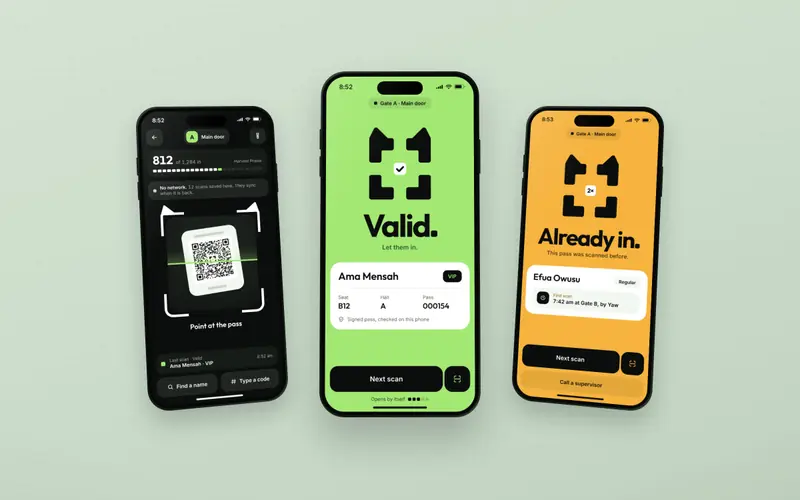
The whole screengives the answer.
The door phone checks each pass on the spot, with or without a network.
Valid
Let them in. Shows the guest’s name.
Already in
Scanned before. Shows when and at which door.
Not valid
Do not let them in. Says why.
No network
Scanning carries on. Scans sync later.
Desk phones for walk-ins
Volunteers register guests at the door. Each one is saved on the phone and sent when there is network.
Live numbers
Who has registered and who is in, door by door. A pass let in twice offline shows as a double entry.
What guests see
No app,no account.
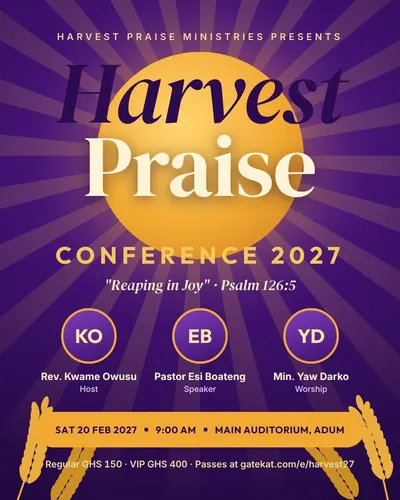
- Greets them by name, with the event and the code.
- Works with no data once opened.
- Saves as a picture or goes to their own WhatsApp.
- The code holds no personal details.
Passes nobody can fake.
Each event has its own signing key, kept on GateKat’s servers. A made-up or edited code shows Not valid.
A copy of a real pass lets one person in. After that, every door shows Already in.